L1, L2 and L3 support levels: IT support tiers 0 to 4 explained
Summary
In the TechSupport Team Support Level Model, L1 (first-line support) logs and triages tickets and solves known issues. L2 (second-level support) does deep troubleshooting and applies approved configuration fixes. L3 (third-level support) makes changes to code, infrastructure or architecture. L0 covers self-service and L4 covers vendor support. Teams can combine levels; the right owner depends on the required skills and approved access.
This guide explains the levels of IT support, what each level does and how a ticket moves between them. It includes the TechSupport Team Support Level Model, a handoff checklist and a free support level definition template.
Sources checked on 10 October 2026.
IT support levels at a glance: L0 to L4
IT support tiers sort work by the skills, access and product ownership that a fix needs. Each level solves what it can and shares context at handoff. The TechSupport Team model below uses five levels. It is a practical model, not a universal standard.
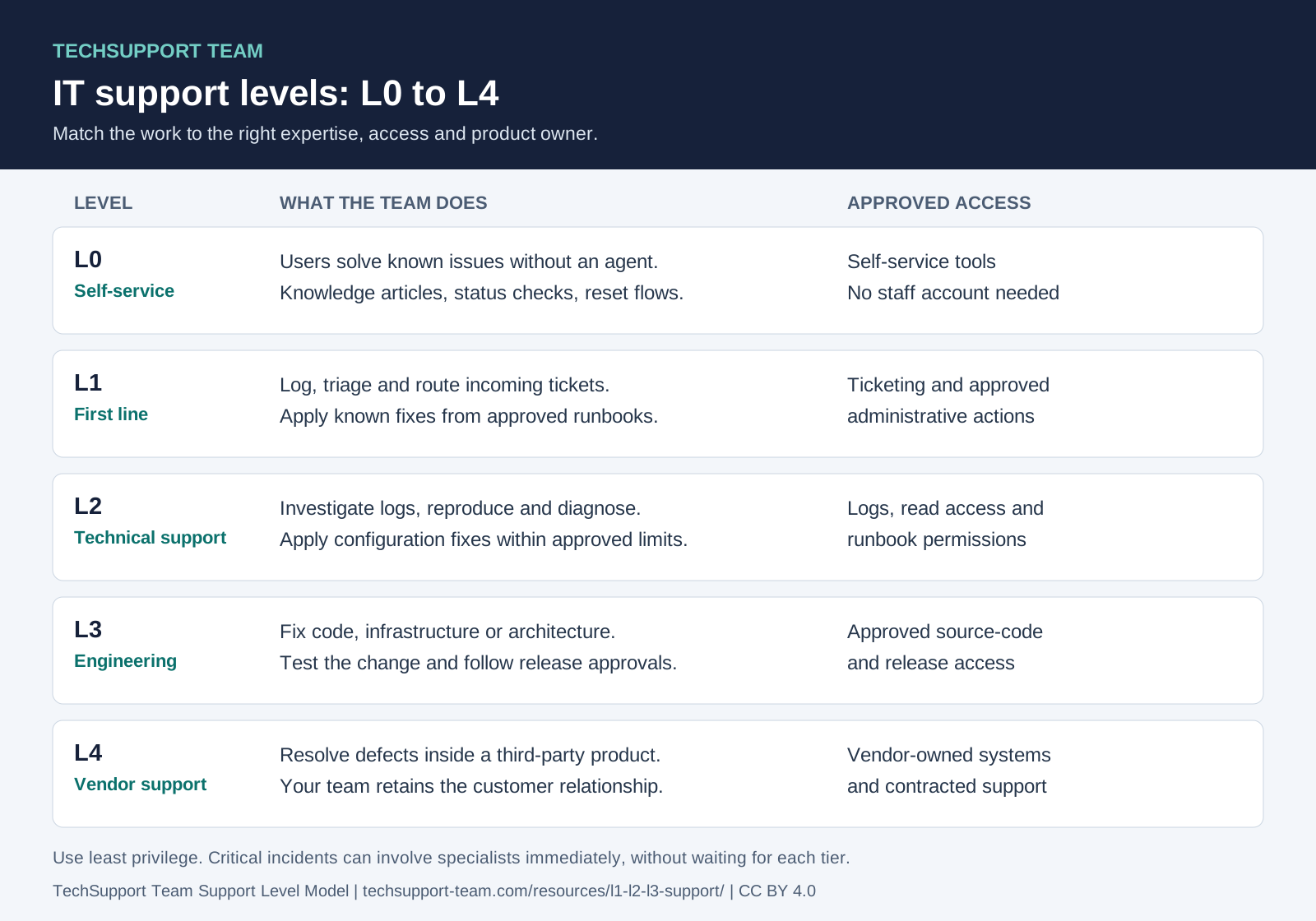
| Level | Also called | Main goal | Typical work | Typical access | Hands off when |
|---|---|---|---|---|---|
| L0 | Tier 0, self-service | Users solve simple issues without an agent | Knowledge base, portal, chatbot, password reset, status checks | Self-service tools only | The answer is not in the self-service content |
| L1 | Tier 1, first line, service desk | Log, triage and solve known issues | Scripts, runbooks, knowledge articles, service requests, routing | Ticketing and approved tools | No runbook fits, or the fix needs more access |
| L2 | Tier 2, technical support | Find the cause and fix it with configuration | Logs, reproduction, configuration, performance, root-cause diagnosis | Back end, admin tools, logs | The fix needs a code, infrastructure or architecture change |
| L3 | Tier 3, engineering, expert support | Make the permanent fix | Bug fixes, hotfixes, patches, infrastructure and design changes | Approved source-code and release access; least privilege | The defect is in a third-party product |
| L4 | Tier 4, vendor or external support | Fix third-party products under contract | Vendor defects, cloud provider issues, hardware faults | Vendor systems | The vendor ships a fix. Your team confirms it |
What is L1 support (tier 1)?
L1 support is the first human contact for a user. Level 1 support staff are service desk generalists. They log every ticket, sort it by category and urgency, and solve known issues with scripts, runbooks and knowledge articles.
- Typical tasks: account and access requests, known errors, how-to questions, service requests, triage and routing.
- Typical access: the ticketing system and a set of approved tools.
- Escalates when: no runbook or article solves the issue, or the fix needs access that L1 does not have.
What is L2 support (tier 2)?
L2 support takes the issues that L1 cannot solve. Level 2 support engineers have deep product knowledge. They read logs, reproduce the issue, check configuration and performance, and find the root cause.
- Typical tasks: in-depth troubleshooting, log analysis, configuration changes within approved limits, performance problems, root-cause diagnosis.
- Typical access: back-end systems, admin tools and logs.
- Escalates when: the fix needs a change to source code, infrastructure or architecture.
In the TechSupport Team model, L2 can also apply a documented workaround to restore service while L3 builds the permanent fix. Write down which workarounds L2 can apply without approval.
What is L3 support (tier 3)?
L3 support is the expert or engineering level. Level 3 support engineers are senior engineers, developers, DevOps engineers or architects. Often they built the product. They find the cause in the code, the design or the infrastructure, and they make the permanent fix.
- Typical tasks: bug fixes, hotfixes and patches, infrastructure or architecture changes, problem management, major incident work.
- Typical access: approved source-code and release access, limited to the work in scope.
- Hands back: a documented fix to L1 and L2, so that the next case of the same issue stays at a lower level.
What are L0 (tier 0) and L4 (tier 4) support?
Tier 0 support is self-service with no agent. Users find answers in a knowledge base, a portal, a service catalog, a forum or a chatbot. Password resets, status checks and how-to questions are typical tier 0 tasks.
Tier 4 support is external. Software vendors, cloud providers, hardware makers or managed service partners fix their own products under a contract or warranty. Your team stays the contact for your customer and tracks the vendor case to the end.
L1 vs L2 vs L3 support: the differences
The three levels differ in skill, access and the kind of fix they make. Use the table to place each task at one level.
| Aspect | L1 support | L2 support | L3 support |
|---|---|---|---|
| Who | Service desk generalists | Experienced support engineers, application specialists | Senior engineers, developers, architects |
| Skills | Customer service and broad basic technical knowledge | Deep product knowledge, log analysis, configuration | Code, infrastructure and system design |
| Typical tasks | Log and triage tickets, apply known fixes, route the rest | Reproduce issues, read logs, change settings, find the root cause | Fix bugs, ship hotfixes and patches, change infrastructure |
| Access | Ticketing and approved tools | Back end, admin tools, logs | Approved source-code and release access |
| Typical output | Resolved known issue or a complete escalation | Configuration fix, diagnosis, documented workaround in your model | Permanent fix, documented and handed back |
| Escalates to | L2 | L3 | L4 (vendor), if the defect is in a third-party product |
Where L2 ends and L3 starts
In the TechSupport Team model, a fix stays at L2 when an approved configuration, data change or runbook resolves it. Changes to code, infrastructure or architecture go to L3. Other teams may use different boundaries. Apply least privilege: grant only the access needed for the approved task.
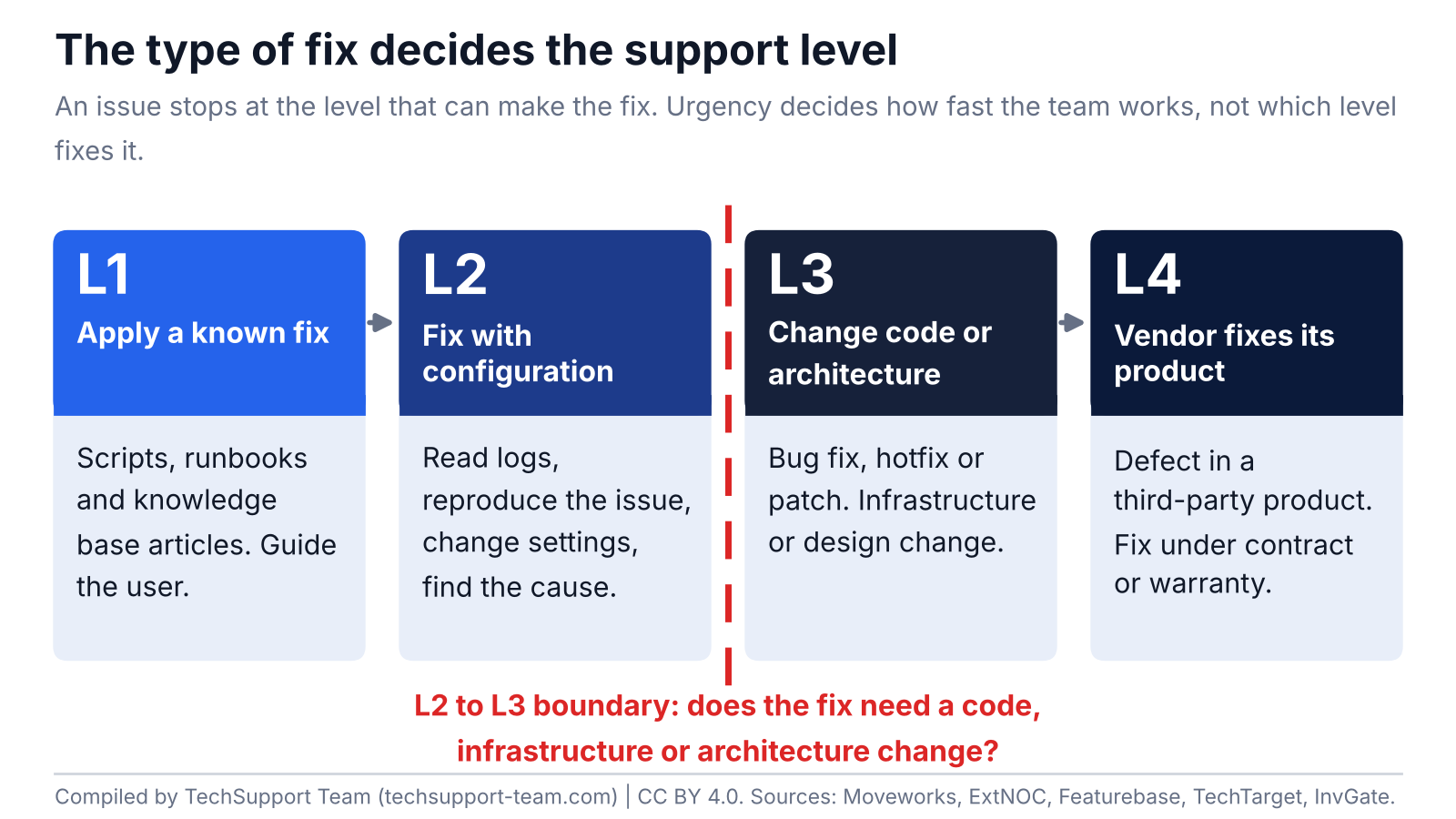
- Stays at L2: a wrong setting, an expired certificate, a full disk or a permission error that an approved runbook resolves.
- Goes to L3: a defect in the application code, a schema change, an infrastructure capacity change, a change to a service design.
- Goes to L4: a defect in a third-party product or a cloud provider's service.
Severity describes impact. Your response policy sets urgency and who joins. The type of fix and approved access decide who makes the change. Critical incidents can bring specialists in immediately; do not wait for serial handoffs. For classification guidance, see the incident severity levels template.
How an incident moves between levels: three examples
These examples are illustrations. They do not describe a client of TechSupport Team.
Example 1: an export times out for one customer
- L1 receives the ticket, confirms the error text and checks the knowledge base. No article matches.
- L1 escalates to L2 with the customer ID, the time of the error and the steps to reproduce.
- L2 reproduces the timeout and finds a large report with no date filter. L2 sets a limit in the configuration.
- L2 documents the fix. L1 adds a knowledge article for the next case.
Example 2: payments fail for one card type
- L1 sees several tickets with the same error and raises the severity. The on-call L2 engineer starts work.
- L2 finds that the failures started after a release and routes the card type to a backup payment path. This is a documented workaround.
- L3 finds a defect in the release and ships a hotfix. L2 removes the workaround after the fix.
- If the defect is in the payment provider's product, L3 opens an L4 vendor case and tracks it.
Example 3: logins are slow every Monday morning
- L1 links several tickets about slow logins between 08:00 and 09:00 on Mondays.
- L2 compares the login times with system jobs and finds a weekly batch job that uses most of the database capacity.
- L3 moves the job to a different time and changes the database index. L2 confirms the result the next Monday.
The TechSupport Team Handoff Checklist
Tiered support breaks at the handoffs. If an escalation arrives without context, the next level repeats the work and the customer repeats the story. Send this information at each handoff.
| Handoff | Required information |
|---|---|
| L0 to L1 | User identity and contact, the self-service article or flow the user tried, the exact error text, a screenshot if the user has one. |
| L1 to L2 | Customer and environment, steps to reproduce, the time of the first error, the runbooks and articles L1 tried, the business impact, the severity, the ticket history. |
| L2 to L3 | The root cause hypothesis, log extracts with timestamps, reproduction steps if available or observed evidence, the configuration checked, any workaround, the affected versions and customer impact. |
| L3 to L4 | The vendor product and version, the evidence that the defect is in the vendor product, the contract or support plan ID, the vendor case number, the internal owner who tracks the case. |
| Any level back down | What changed, how to confirm the fix, what the customer must do, the knowledge article to create or update. |
- Write the ticket so that the next level can start without a call.
- Attach evidence, not opinions: logs, screenshots, timestamps and versions.
- State what you tried and what changed.
- Name one owner for customer updates until the ticket closes.
- Record the handoff time. It feeds your escalation metrics.
To set time limits and contacts for each handoff, use the free escalation matrix template.
How many support levels do you need?
There is no single standard. Choose the smallest number of levels that gives each type of fix one clear owner.
| Setup | Fits when | Watch for |
|---|---|---|
| L1, L2 and L3 | You have a service desk, a support engineering group and a product team | Clear L2 to L3 criteria, so that L3 does not get configuration work |
| L1 and a combined L2/L3 | Your team is small and the same engineers make configuration and code fixes | Define the two kinds of fixes anyway, for metrics and access control |
| L0 added | Many tickets are repeat questions or password resets | Keep the self-service content current, or tickets return to L1 |
| L4 added | You depend on vendor or cloud products that you cannot fix | Track vendor cases in your own ticket, with one internal owner |
Tiered support vs Intelligent Swarming
Intelligent Swarming is a support model from the Consortium for Service Innovation. It replaces fixed tiers and linear escalation. A new issue goes straight to the person who is best placed to help. That person owns the issue to the end and pulls in others when needed.
- Tiered support fits work where most issues are known and simple, and a runbook can solve them.
- Swarming fits new and complex issues where handoffs add delay. Ticket volume alone does not decide whether it fits.
- You can mix both. Keep known issues in tiers and knowledge articles. Send new and complex issues to a swarm.
Shift-left: move work to the lowest level that can fix it
Shift-left moves resolution to the earliest point that can handle it: from specialists to the front line, to self-service and to automation. It frees L2 and L3 engineers for harder work.
- Find the issues that L2 and L3 solve again and again.
- Write a runbook or a knowledge article for each one.
- Give L1 the access and the training to apply the fix safely.
- Move the simplest fixes to self-service or automation.
- Track the escalation rate to confirm the change.
In DevOps, "shift-left" has a different meaning: test and secure software earlier in development. This guide uses the IT support meaning.
How to measure each support level
Measure each level and each handoff. Use the same definitions in every report.
| Metric | What it measures | Formula | Use it for |
|---|---|---|---|
| First contact resolution (FCR) | Share of tickets solved in the first interaction, with no follow-up or transfer | Tickets solved in the first interaction / all tickets x 100 | L1 knowledge and runbook quality |
| Escalation rate | Share of tickets passed to another or a higher level | Escalated tickets / all tickets x 100 | Each handoff (L1 to L2, L2 to L3) |
| Mean time to acknowledge (MTTA) | Average time from an alert to the first human acknowledgment | Sum of alert-to-acknowledgment times / acknowledged incidents | On-call response at L2 and L3 |
| Mean time to resolve (MTTR) | Average time to fully resolve an issue | Total time to resolve / number of incidents | End-to-end resolution, per level and overall |
Sources: Atlassian's incident metrics; PagerDuty's acknowledgment definition.
How to define your support levels
- Tasks and access: list the tasks that each level owns and the access that each level needs.
- Escalation criteria: write the triggers for each handoff, and the time limits, in an escalation matrix.
- Severity: agree the severity levels and what each level means for response. See the incident severity levels template.
- Ownership: name the owner of each ticket at each stage, and the owner of customer updates.
- Targets: set response and resolution targets per severity. The SLA and uptime calculator converts uptime targets to allowed downtime.
- Review: check the definitions every quarter against your escalation data.
Free template: the TechSupport Team Support Level Definition Template (CSV) has one row per level, with scope, tasks, access, entry criteria, exit criteria and owner. Open it in Excel or Google Sheets and replace the example text.
Common problems with tiered support, and fixes
| Problem | What you see | Fix |
|---|---|---|
| Lost context at handoffs | The next level asks the customer the same questions | Use the handoff checklist. Start urgent response with available facts and collect missing context in parallel. |
| Tickets bounce between levels | A ticket goes up and down several times | Write exit criteria for each level. Name one owner per stage. |
| L3 gets configuration work | Engineers spend time on settings and access issues | Move the fix type to L2 and give L2 the access it needs. |
| L1 escalates too early | High escalation rate on known issues | Add runbooks and knowledge articles. Train L1 on the top issues. |
| Vendor cases go quiet | No update on an L4 case for days | Keep the vendor case inside your own ticket with an internal owner. |
Outsourcing L2 and L3 support
You can outsource L2 and L3 support and keep control. Keep these decisions in-house: priorities, access approval, release approval and customer communication.
An outsourced L2 or L3 engineer needs what an in-house engineer needs: access to your tools, runbooks, an escalation matrix and tested contacts.
TechSupport Team provides dedicated L2 and L3 support services. Our engineers join your team and work in your tools, with coverage up to 24/7. We do not run L1 helpdesks. See how we work.
If your queue involves tenant-specific login, API or billing failures, review our SaaS technical support service. It explains how support engineers investigate those incidents while your team keeps the customer conversation.
Frequently asked questions
What is the difference between L1, L2 and L3 support?
L1 support logs, triages and solves known issues with scripts and runbooks. L2 support does deep technical troubleshooting and configuration fixes. L3 support changes code, infrastructure or architecture. In the TechSupport Team Support Level Model, the type of fix decides the level.
Are support levels and support tiers the same thing?
Yes. "Level" and "tier" mean the same thing, so L1 support and tier 1 support are the same level. Some teams use 3 tiers. Others use 4 or 5.
What is tier 0 support?
Tier 0 is self-service with no agent. Users find answers in a knowledge base, a portal or a chatbot. Password resets and status checks are typical tier 0 tasks.
What is tier 4 support?
Tier 4 is external support from software vendors, cloud providers or hardware makers, under a contract or warranty. Your team stays the contact for your customer and tracks the vendor case.
What does a level 2 support engineer do?
A level 2 support engineer takes issues that L1 cannot solve. The engineer reads logs, reproduces the issue, checks configuration and performance, and finds the root cause. L2 fixes configuration-level problems and escalates code-level problems to L3.
Is L3 support the same as the engineering team?
Often, yes. Senior engineers, developers or architects who know the code and the infrastructure usually staff L3. For many of them, L3 support is not their main job.
When should L1 escalate a ticket to L2?
L1 escalates when no runbook or knowledge article solves the issue, or when the fix needs access that L1 does not have. L1 also escalates when the issue matches an L2 trigger in your escalation matrix. Send the full context with the ticket.
Who owns the ticket after escalation?
Define this in writing. In the TechSupport Team Support Level Model, the team that holds the ticket owns the next action. One named owner keeps the customer updated until the ticket closes.
Which level writes the root cause analysis?
The level that makes the permanent fix usually writes the root cause analysis. For a code defect, that is L3. For a configuration problem, that is L2. L1 adds the customer impact and the timeline.
Does every company use the same support levels?
No. There is no single standard. Many models use five tiers, from L0 to L4, but some teams use only 3 or 4. Write down your own definitions and share them with every team and vendor.
Is tiered support better than Intelligent Swarming?
They fit different work. Tiered support works well when most issues are known and simple. Intelligent Swarming, from the Consortium for Service Innovation, routes new and complex issues to the best person without fixed tiers.
Should L2 and L3 support be in-house or outsourced?
Keep ownership of priorities, access approval and customer communication in-house. Dedicated L2 and L3 engineers can come from a partner if they work in your tools and follow your escalation matrix. TechSupport Team provides engineers on this model.
Sources
- BMC Helix: Support levels, level 1, level 2, level 3 (2024)
- InvGate: The 5 levels of IT support (2026)
- Moveworks: IT support levels overview (2025)
- TechTarget: Customer service tiers and escalation paths (2026)
- Zendesk: How to set up support tiers (2026)
- Featurebase: IT support levels (2026)
- ExtNOC: IT support tiers
- HDI: Embracing shift left to improve service delivery (2024, updated 2025)
- Consortium for Service Innovation: Intelligent Swarming 101
- Atlassian: Common incident management metrics
- PagerDuty: What is MTTR?
- Splunk: MTTA, mean time to acknowledge (2025)
Cite and reuse
Suggested citation: TechSupport Team. L1, L2 and L3 support levels: IT support tiers 0 to 4 explained. Version 2.0, October 2026.
License: You can copy, adapt and republish the text, tables and figures under the Creative Commons Attribution 4.0 license (CC BY 4.0). Name TechSupport Team as the source and link to this page.
Embed Figure 1: copy the code below to show the L0 to L4 diagram on your site.
Embed code
<figure>
  <a href="https://techsupport-team.com/resources/l1-l2-l3-support/">
    <img src="https://techsupport-team.com/assets/resources/l1-l2-l3-support/fig-h1-support-tiers-l0-l4.svg"
         alt="IT support levels L0 to L4, TechSupport Team Support Level Model" width="800" height="560" loading="lazy">
  </a>
  <figcaption>IT support levels L0 to L4. Source: <a href="https://techsupport-team.com/resources/l1-l2-l3-support/">TechSupport Team</a>, CC BY 4.0.</figcaption>
</figure>Update log
- 2 October 2026: version 1.0 published.
- 10 October 2026: version 2.0. Added L0 and L4, the L2 to L3 boundary, the handoff checklist, metrics, the definition template and sources.
About TechSupport Team
TechSupport Team provides dedicated L2 and L3 support engineers who join your team and work in your tools, with coverage up to 24/7. We are a new company, so this page contains no client data. We publish our models and templates so that you can check our approach before you talk to us.