Incident severity levels (SEV0 to SEV4) and priority matrix: free template
Summary
Incident severity levels rank incidents by their impact on users and the business. Common schemes use 3 to 5 levels, with lower numbers for more severe incidents. In the TechSupport Team Severity Model, SEV1 means a core function is down for many customers with no workaround. SEV0 is an optional level for catastrophic events.
Download the Markdown version. No signup needed.
Sources checked on 10 October 2026.
The TechSupport Team Severity Model: SEV0 to SEV4
Use one scale for every team and product. Start at SEV0 and apply the first level whose criteria match. Response times and update intervals are examples. Set your own from your service levels.
Define "many" and "some" for your product, using affected accounts, regions or critical workflows. If you omit SEV0, include its criteria in SEV1.
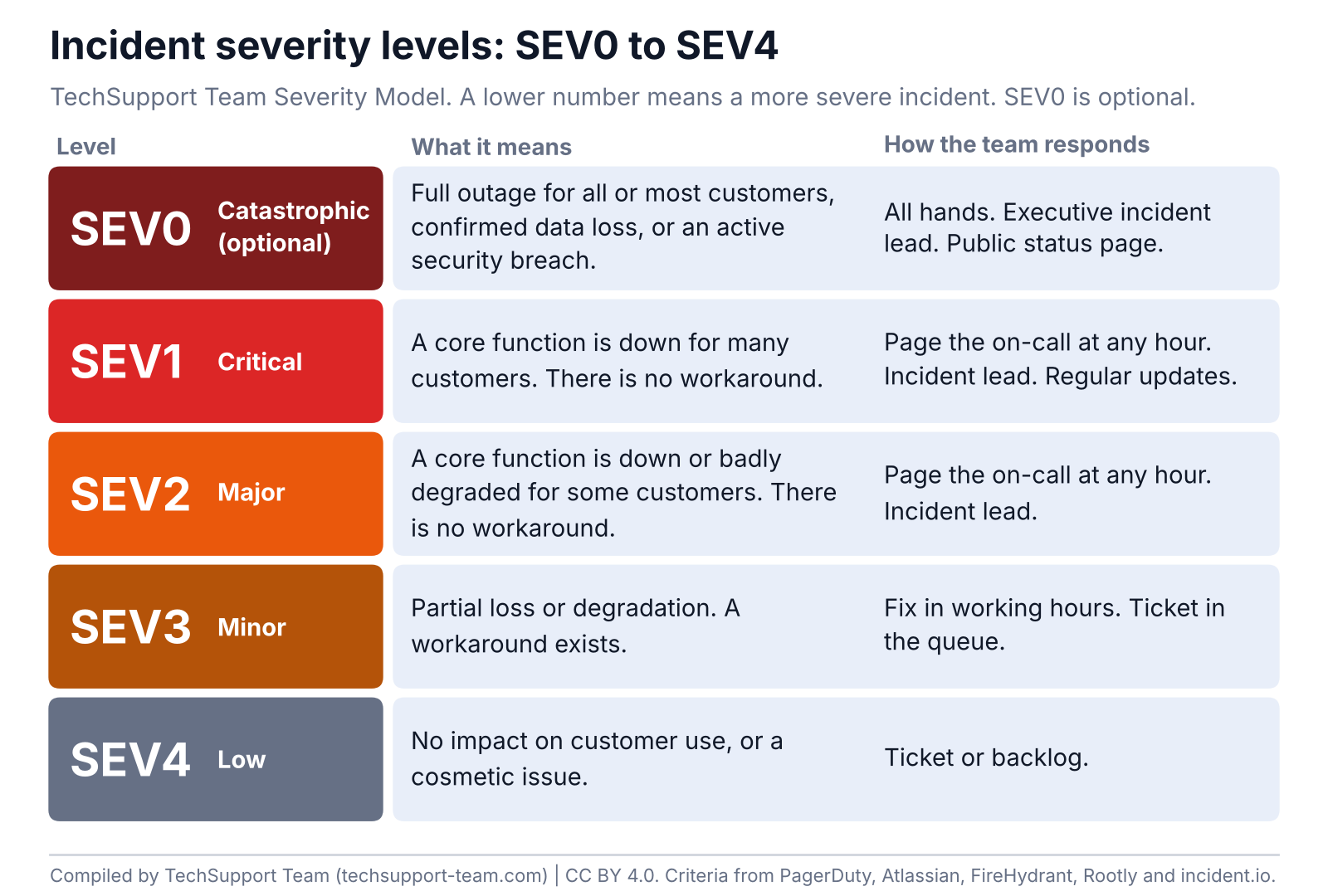
| Level | Name | Criteria | SaaS examples | Response | Updates (example) |
|---|---|---|---|---|---|
| SEV0 | Catastrophic (optional) | Full outage for all or most customers, confirmed data loss, or an active security breach | All customers cannot log in, in every region. Customer data is exposed. | All hands. Executive incident lead. Public status page. | Every 30 minutes |
| SEV1 | Critical | A core function is down or unusable for many customers. There is no workaround. | Payments fail for most customers. The API returns errors for most requests. | Page the on-call at any hour. Incident lead. | Every 30 minutes |
| SEV2 | Major | A core function is down or badly degraded for some customers. There is no workaround. | One region cannot export reports. Search fails for a large customer group. | Page the on-call at any hour. Incident lead. | Every 60 minutes |
| SEV3 | Minor | Partial loss or degradation. A workaround exists. | A dashboard is slow. One integration fails, and manual upload works. | Fix in working hours. Ticket in the queue. | Daily |
| SEV4 | Low | No impact on customer use, or a cosmetic issue. | A typo in the interface. A slow internal admin tool. One host fails behind a load balancer. | Ticket or backlog. | None |
Sources: Download the CSV.
What is a SEV1 incident?
A SEV1 incident is a critical incident. A core function is down or unusable for many customers, and there is no workaround. If your scale has no SEV0, SEV1 also covers full outages, data loss and security breaches.
- Page the on-call engineer at any hour.
- Assign an incident lead and open an incident channel.
- Post status updates at fixed times until the incident ends.
- Write a post-incident review.
What is a SEV2 incident?
In the TechSupport Team Severity Model, a SEV2 incident is a major incident with a smaller scope. A core function is down or badly degraded for some customers, and there is no workaround. Atlassian pages the on-call team at any hour for SEV2, as for SEV1.
SEV1 vs SEV2: how to decide
Check for data loss, an active breach or a full outage first. Those conditions remain SEV0, or SEV1 when your scale omits SEV0. For other core-function failures, ask how many customers are affected and whether a workaround exists. Many customers with no workaround is SEV1. Some customers with no workaround is SEV2. Partial loss with a usable workaround is SEV3.
A workaround counts only if affected customers can use it and it restores the task. Reassess the remaining impact before lowering severity.
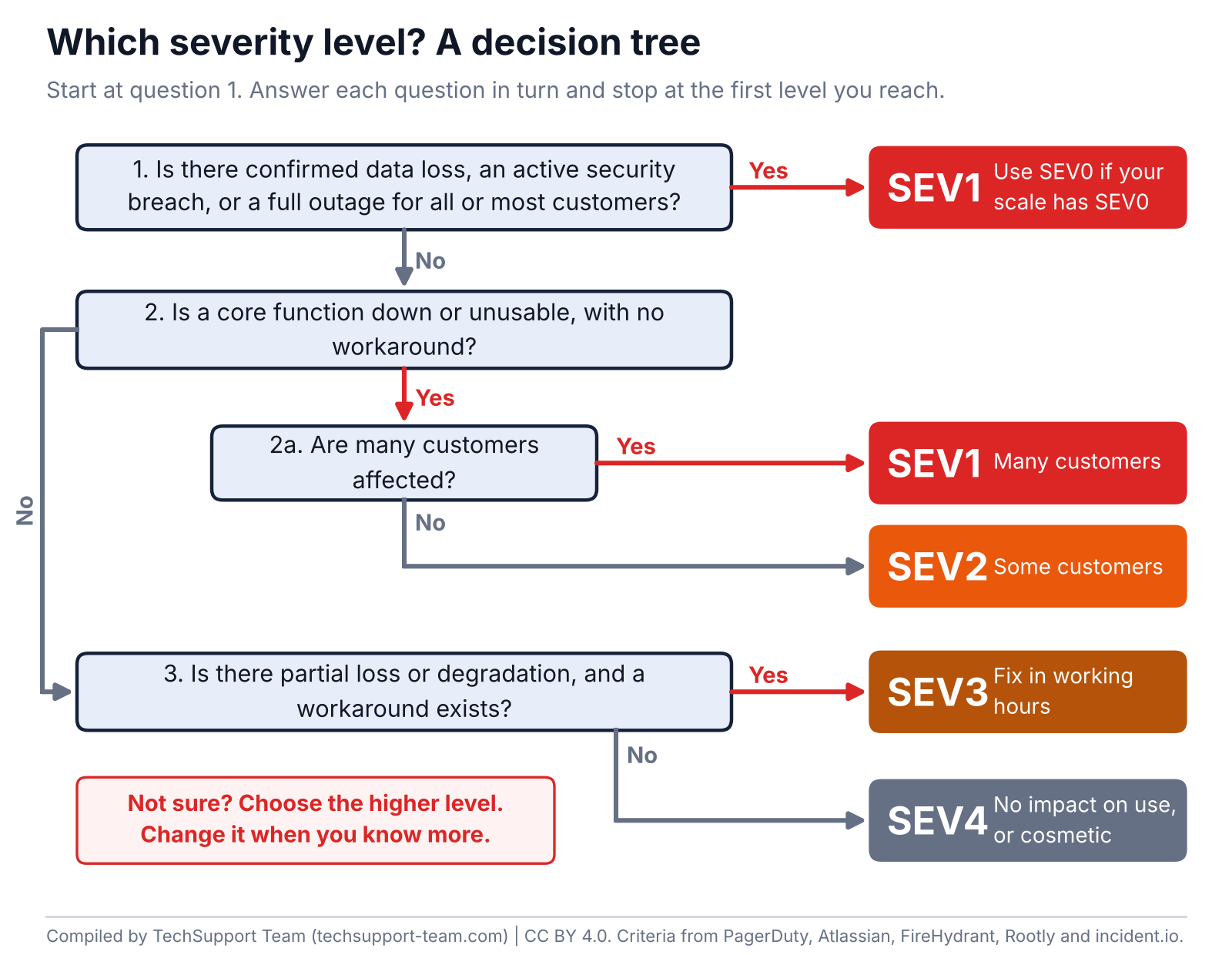
Our rule: if you are not sure between two levels, choose the higher one. Change it when you know more.
What is SEV0?
SEV0 is an optional level above SEV1. It is for catastrophic events: a full outage for all or most customers, confirmed data loss or an active security breach. Rootly and FireHydrant include SEV0 in their guidance. Datadog lets you choose SEV-0 as the top incident level. Azure Monitor alerts use Sev0 to Sev4, with Sev0 as the most severe. Alert severity still needs mapping to business incident impact.
SEV3 and SEV4
In the TechSupport Team Severity Model, SEV3 is partial loss or degradation with a workaround. The team fixes it in working hours. SEV4 has no impact on customer use, or it is cosmetic. It goes to the ticket queue or the backlog.
Severity vs priority
| Aspect | Severity | Priority |
|---|---|---|
| What it measures | Impact on users and the business | How urgently the team acts, and in what order |
| Typical labels | SEV0 to SEV4, or Critical, Major, Minor | P1 to P5, or Critical, High, Moderate, Low, Planning |
| How it is set | From the impact criteria in your severity scale | Often from a matrix of impact and urgency |
| Example where they differ | A crash in a development environment: high severity for that system, no customer impact | A typo on the homepage: low severity, but high priority to fix |
Severity and priority usually move together. Keep both fields when they can differ, and write down how you map one to the other.
Incident priority matrix: impact x urgency
ITIL-style service management sets priority from two inputs. Impact is how much of the business the incident affects. Urgency is how fast the business needs a fix. A lookup matrix turns the two inputs into a priority. Here, impact x urgency means a lookup, not multiplication of the numbers.
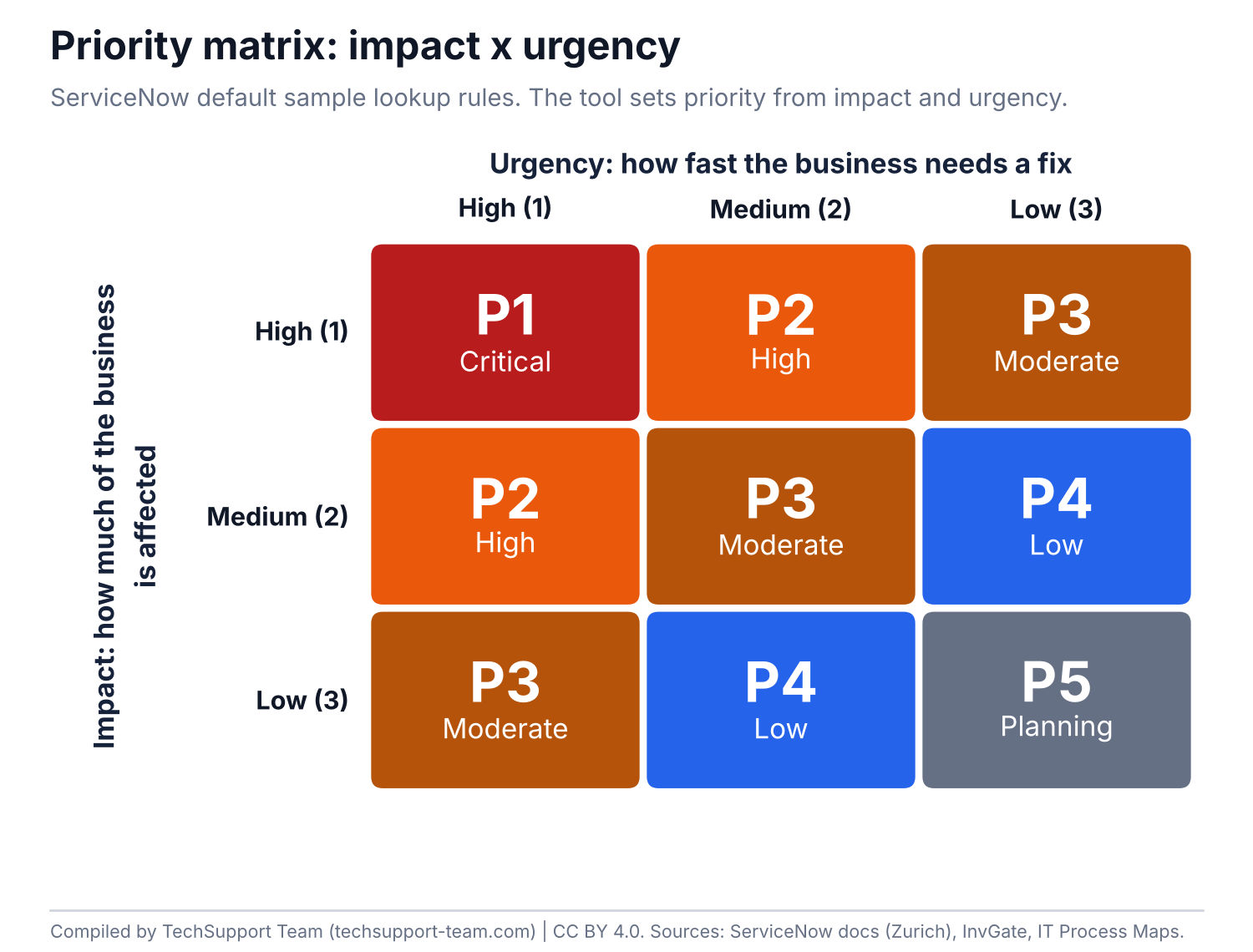
| Impact \ Urgency | 1 High | 2 Medium | 3 Low |
|---|---|---|---|
| 1 High | P1 Critical | P2 High | P3 Moderate |
| 2 Medium | P2 High | P3 Moderate | P4 Low |
| 3 Low | P3 Moderate | P4 Low | P5 Planning |
Sources: ServiceNow sample lookup rules.
- ServiceNow: ships this 3 x 3 grid as sample lookup data and makes Priority read-only by default.
- Jira Service Management Data Center: can calculate priority automatically from impact and urgency. Its 11.2 documentation uses a 4 x 4 example grid.
- Freshservice: maps each impact and urgency pair to one of four fixed priorities: Low, Medium, High and Urgent.
Target response and resolution times per priority differ from source to source. Treat any published times as examples, not as an ITIL standard. To convert an uptime target into allowed downtime, use the SLA and uptime calculator.
Severity levels at PagerDuty, Atlassian, incident.io and others
This table compares published guidance and product settings. A vendor's example scale is not necessarily its product default or your team's configured scale. Azure Monitor describes alert severity, which you must map to incident impact.
| Vendor | Level names | Criteria summary |
|---|---|---|
| PagerDuty | SEV-1 to SEV-5 in its response guide | 1: critical, needs public notice, many customers affected or data exposed. 2: critical issue that badly impairs many customers. 3: stability issue or minor customer impact. 4: no impact on customer use. 5: cosmetic. SEV-1 and SEV-2 are major incidents. |
| Atlassian | SEV 1 to SEV 3 in its published scale | 1: down for all customers, data loss or breach. 2: down for a subset, or a core function badly hit. 3: minor, a workaround exists or degradation is usable. |
| incident.io | Critical, Major, Minor in its practical guide | Critical: full outage or data breach. Major: significant, a workaround may exist. Minor: low impact, handled in working hours. |
| Splunk | SEV 1 to SEV 5 in its educational guide | 1: many production users. 2: limited users. 3: errors or heavy load. 4: no serious user impact. 5: low-level deficiency. |
| FireHydrant | SEV1 to SEV5, optional SEV0 in its guidance | 0: catastrophic. 1: most of the product unusable, data or revenue loss. 2: primary function badly hit, no workaround. 3: partial, with a workaround. 4: internal or minor. 5: cosmetic. |
| Datadog | SEV-0 or SEV-1 as the top level (default SEV-1) | 1 to 10 configurable levels. Default sub-labels: Critical, High, Moderate, Low, Minor. Descriptions can be customized. |
| Rootly | SEV0 to SEV3 in its SaaS example. Names are configurable | 0: total outage, active data loss or breach. 1: major feature broken, no workaround. 2: degraded, a workaround exists. 3: minor or cosmetic. |
| GitLab | S1 Critical, S2 High, S3 Medium, S4 Low, Unknown | The incident interface lists these labels. The cited product page does not define business-impact criteria. |
| Better Stack | SEV1 to SEV3 in its guide, with optional SEV4 and SEV5 | 1: down for all, breach or data loss. 2: a core function or a subset down. 3: slight inconvenience. |
| Azure Monitor alerts | Sev0 to Sev4 | Whole numbers from 0 to 4. Sev0 is the most severe. |
How to map severity to priority and to other scales
The labels do not map one to one. Compare the criteria, not the numbers. The table suggests approximate matches to the published examples above. It is a starting point for review, not a rule for automatic conversion. Check customer scope, remaining impact and required response before mapping.
| TechSupport Team | PagerDuty | Atlassian | incident.io | Rootly | Priority example |
|---|---|---|---|---|---|
| SEV0 | SEV-1 | SEV 1 | Critical | SEV0 | P1 |
| SEV1 | SEV-1 or SEV-2 | SEV 1 or SEV 2 | Critical | SEV1 | P1 |
| SEV2 | SEV-2 | SEV 2 | Major | SEV1 | P2 |
| SEV3 | SEV-3 | SEV 3 | Minor | SEV2 | P3 |
| SEV4 | SEV-4 or SEV-5 | SEV 3 | Minor | SEV3 | P4 or P5 |
How to set up severity levels in 6 steps
- Choose the number of levels. Start with the smallest number that your team can apply the same way every time.
- Write criteria for each level in 1 or 2 sentences. Use impact, scope and the existence of a workaround.
- Add 2 or 3 examples per level from your own product.
- Set the response for each level: who gets paged, who leads and how often you update customers.
- Decide who can declare, raise and lower the severity. Record every change.
- Review the scale after each SEV0 or SEV1 and every quarter.
Put the escalation path for each level in an escalation matrix template. For the support level that owns each fix, see L1, L2 and L3 support levels.
When to declare an incident
The Google SRE chapter on managing incidents recommends declaring early. It gives the author's team guidelines: declare when any of these conditions is true.
- You need to involve a second team to fix the problem.
- The outage is visible to customers.
- The issue is still unsolved after an hour of focused analysis.
Frequently asked questions
What are incident severity levels?
Incident severity levels rank incidents by their impact on users and the business. Common schemes use 3 to 5 levels. In numbered SEV scales, a lower number usually means greater severity, so SEV1 is worse than SEV3.
What does SEV1 mean?
SEV1 means a critical incident. In the TechSupport Team Severity Model, a core function is down for many customers and there is no workaround. The team pages the on-call engineer at any hour.
What is the difference between SEV1 and SEV2?
Scope decides. In the TechSupport Team Severity Model, SEV1 affects many customers and SEV2 affects some customers. In both cases a core function is down or badly degraded with no workaround.
When should you use SEV0?
Use SEV0 if you need a level above SEV1 for catastrophic events, such as a full outage, confirmed data loss or an active breach. Rootly and FireHydrant include it in their guidance. Datadog permits SEV-0, and Azure Monitor uses Sev0 for its highest alert severity. If you omit SEV0, include its criteria in SEV1.
What is the difference between severity and priority?
Severity measures the impact on users and the business. Priority sets how urgently the team acts and in what order. A homepage typo can have low severity but high priority.
Is P1 the same as SEV1?
Not always. P1 usually comes from a priority matrix of impact and urgency. SEV1 comes from a severity scale. Many teams align the two, but no mapping is universal. Write down your own mapping.
How many severity levels should we have?
Use the smallest number that your team can apply the same way every time. Common schemes use 3 to 5 levels. incident.io suggests that startups begin with 3 levels.
What is an ITIL priority matrix?
An ITIL priority matrix sets the priority of an incident from its impact and its urgency. In the ServiceNow default matrix, high impact and high urgency give priority 1 (Critical).
Can severity change during an incident?
Yes. Change the level when you learn more about the impact. Record each change, the time and the reason in the incident timeline.
Which severity levels count as a major incident?
PagerDuty treats SEV1 and SEV2 as major incidents and also allows coordinated response for lower severities. Atlassian pages at any hour for SEV1 and SEV2. In the TechSupport Team Severity Model, SEV0, SEV1 and SEV2 start a major incident response.
Sources
- Atlassian: Severity levels
- PagerDuty Incident Response: Severity levels
- PagerDuty: Incident severity classification
- Splunk: Incident severity levels (2022)
- incident.io: Severities and Designing your severity levels
- FireHydrant: Incident severity and priority (2022)
- Datadog: Incident information settings
- Rootly: Severities
- GitLab: Incidents
- Better Stack: Severity levels (2022)
- ServiceNow: Priority lookup rules (Zurich) (updated 2025-01-30)
- Jira Service Management: Calculating priority automatically (2025)
- Freshservice: Priority matrix
- InvGate: ITIL priority matrix (2026)
- Google SRE book: Managing incidents
- Microsoft: Azure Monitor alert severity
Cite and reuse
Suggested citation: TechSupport Team. Incident Severity Levels (SEV0 to SEV4) and Priority Matrix. Version 1.0, October 2026.
License: You can copy, adapt and share the model, the tables and the figures under the Creative Commons Attribution 4.0 license (CC BY 4.0). Name TechSupport Team as the source and link to this page.
Download: TechSupport Team Severity Model (CSV)
Update log
- 10 October 2026: version 1.0 published. Vendor schemes checked on 10 October 2026.
About TechSupport Team
TechSupport Team provides dedicated L2 and L3 support engineers who join your team, with coverage up to 24/7. Our engineers work with your severity model, not ours. We are a new company, so this page contains no client data.