Escalation matrix template: free Excel and CSV download, with a filled SaaS example
Summary
An escalation matrix is a document or system that sets when an issue escalates, through which levels, to whom and how fast. A good matrix lists the escalation levels, a contact and a backup for each level, the time limits, the triggers and the communication channels. Download the free TechSupport Team Escalation Matrix Template in Excel or CSV.
Download the Markdown version. No signup needed.
Sources checked on 10 October 2026.
Download the escalation matrix template
The TechSupport Team Escalation Matrix Template has a blank matrix, a filled SaaS example, a contacts sheet and instructions. It is free under CC BY 4.0.
Contact fields are intentionally blank for your own names or rotation IDs. Backup entries in the example are roles, not contact details.
- Download Excel (.xlsx): sheets "How to use", "Matrix", "SaaS example" and "Contacts", with dropdowns for severity, type and channel.
- Download CSV (blank) and CSV (SaaS example): for Google Sheets, Notion or your ITSM tool.
- Markdown version: for Confluence, GitHub or a runbook.
What is an escalation matrix?
An escalation matrix tells your team who to contact next, when and how. It turns escalation from a judgment call into a rule. A simple matrix fits on one page. A larger one has a separate path for each severity level or incident type.
Most escalation matrices contain five parts:
- Escalation levels: the order in which people or teams get involved.
- Contacts: a role or an on-call rotation for each level, with a backup.
- Time limits: how long each level has before the next level gets notified.
- Triggers: the conditions that start an escalation, for example time, severity, complexity or a customer risk.
- Channels: how each level gets notified, for example a page, a phone call or a chat message.
Escalation matrix format: the columns in the template
| Column | What to enter | Example |
|---|---|---|
| Severity | The severity level that this path applies to | SEV1 |
| Level | The order in the path, starting at 1 | 3 |
| Escalation type | Automatic, Manual, Functional or Hierarchical | Functional |
| Trigger | The condition that moves the issue to this level | Fix needs a code change |
| Wait time (minutes) | Minutes after the start of the incident | 10 |
| Contact role | The role or rotation, not only a name | L3 engineer on-call |
| Primary and backup contact | Names or rotation IDs | Rotation "backend-primary" |
| Channel | How the contact gets notified | Page |
| Action expected | What this level must do | Join the incident and plan the fix |
| Notes | Anything else, for example time zones | Example time |
Wait values are minutes since the incident starts. They are not delays between rows. The SEV3 threshold counts working time. Rows at the same time can run in parallel. A blank wait means escalate when the trigger applies.
Escalation matrix example for a SaaS company
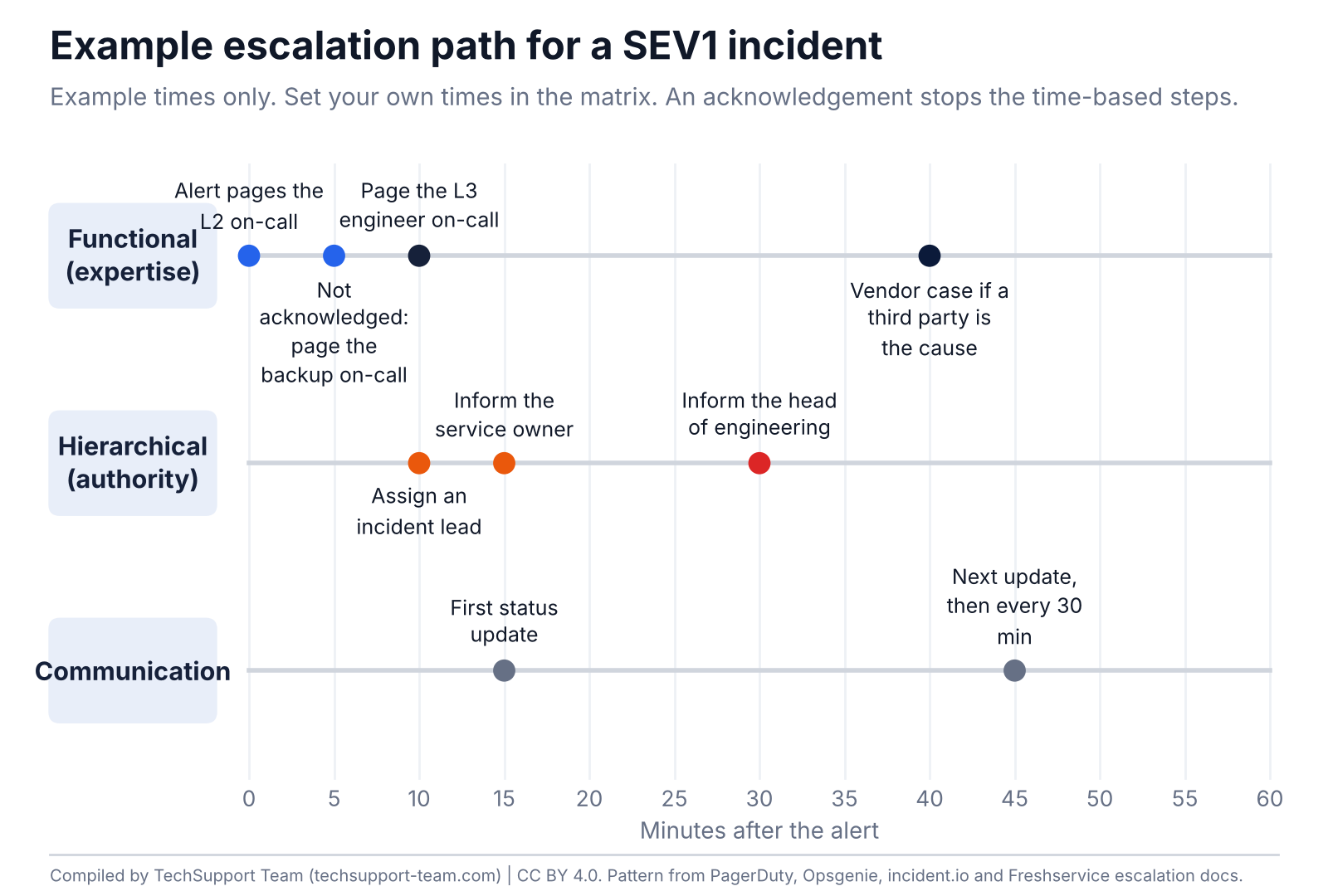
This filled example shows a matrix for a SaaS product with L2 and L3 engineers on call. The times are examples. Set your own times from your response targets.
| Severity | Level | Trigger | Wait | Contact role | Channel | Type |
|---|---|---|---|---|---|---|
| SEV1 | 1 | Alert fires or a SEV1 ticket opens | 0 min | L2 on-call engineer | Page | Automatic |
| SEV1 | 2 | Level 1 does not acknowledge | 5 min | L2 backup on-call | Page and phone | Automatic |
| SEV1 | 3 | Fix needs a code or infrastructure change | 10 min | L3 engineer on-call | Page | Functional |
| SEV1 | 4 | SEV1 declared | 10 min | Incident lead | Page | Hierarchical |
| SEV1 | 5 | Customer impact confirmed | 15 min | Service owner | Phone | Hierarchical |
| SEV1 | 6 | Not resolved after 30 minutes | 30 min | Head of engineering | Phone | Hierarchical |
| SEV1 | 7 | A third-party product is the cause | When needed | Vendor support (L4) | Vendor portal and phone | Functional |
| SEV2 | 1 | Alert fires or a SEV2 ticket opens | 0 min | L2 on-call engineer | Page | Automatic |
| SEV2 | 2 | Level 1 does not acknowledge | 15 min | L2 backup on-call | Page | Automatic |
| SEV2 | 3 | Fix needs a code or infrastructure change | 30 min | L3 engineer on-call | Page | Functional |
| SEV2 | 4 | Not resolved after 2 hours | 120 min | Service owner | Chat | Hierarchical |
| SEV3 | 1 | Ticket in the L2 queue | 0 min | L2 queue | Ticket | Manual |
| SEV3 | 2 | No response in 4 working hours | 240 min | L2 team lead | Email and chat | Automatic |
Functional vs hierarchical escalation
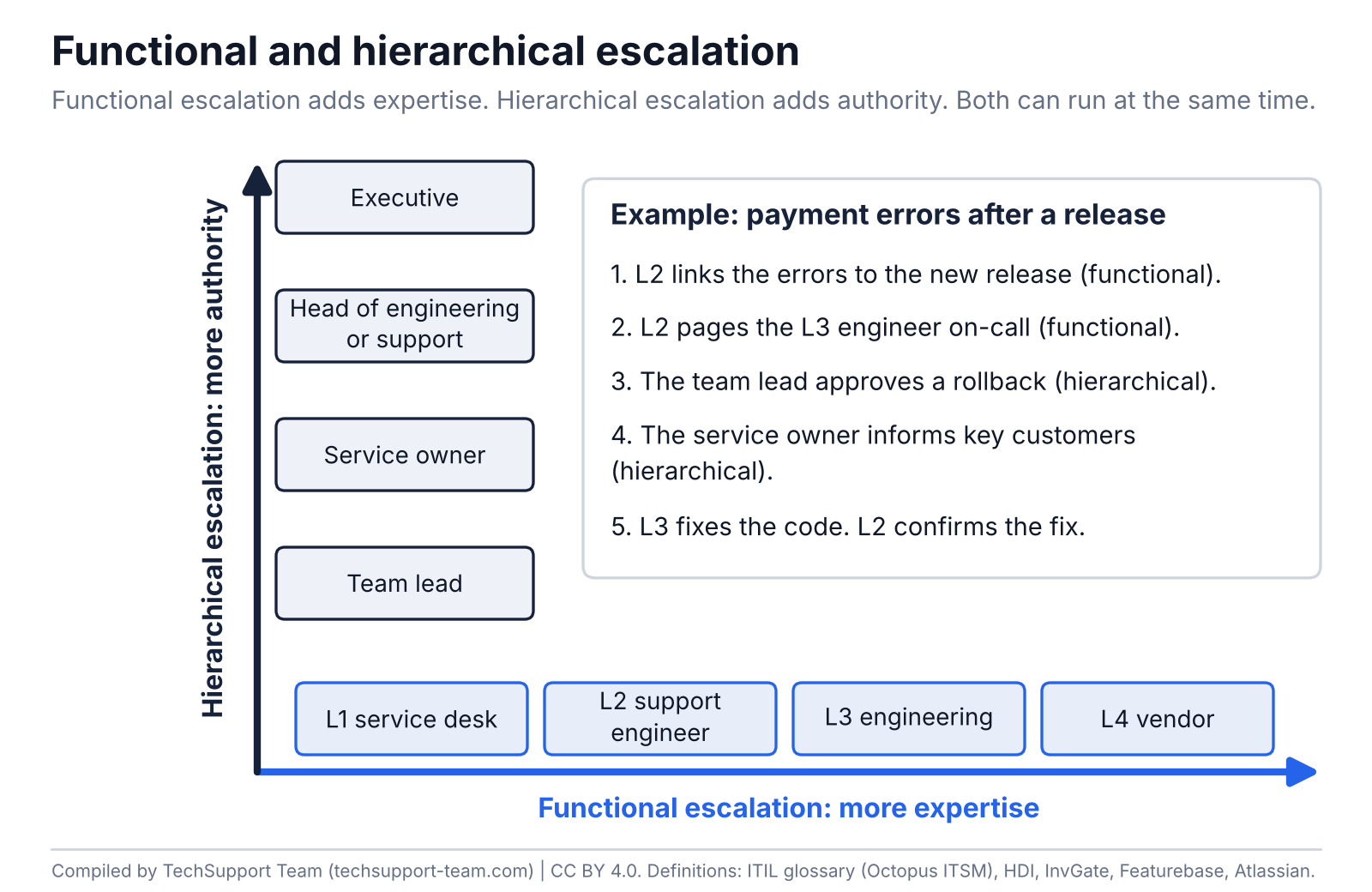
In ITIL usage, there are two directions of escalation. A matrix needs both.
| Type | What moves | Example | Use it when |
|---|---|---|---|
| Functional escalation | The issue moves to a team with more expertise | L2 pages the L3 engineer on-call because the fix needs a code change | The current level cannot make the fix |
| Hierarchical escalation | More authority joins the issue | A manager approves an emergency change or adds people | A decision, approval or more resources are needed |
Manual and automatic escalation
- Manual escalation: a person decides to escalate, for example when the fix needs more skill or access.
- Automatic (time-based) escalation: a rule escalates the issue when an SLA (service-level agreement) timer runs out, or when nobody acknowledges or closes an alert in time.
Use automatic escalation for response times. Use manual escalation for skill, access and approval needs.
Escalation process: 7 steps to build your matrix
- List your severity levels. Use the incident severity levels template if you do not have them.
- For each severity, list the levels in the order that people get contacted.
- Write the trigger for each level: a time limit, a severity, a skill need or an approval need.
- Name a role, a primary contact and a backup contact for each level.
- Set the wait time for each level from your response targets.
- Choose the channel for each level and set it up in your on-call tool.
- Test the matrix with a drill. Review it every quarter and after every SEV1.
Escalation policy, matrix and process: the difference
| Term | What it is in this guide | Where it lives |
|---|---|---|
| Escalation matrix | The table of levels, triggers, contacts, times and channels | A document or a sheet, like this template |
| Escalation policy | The part of the matrix that an on-call tool runs: ordered levels and wait times | PagerDuty, Jira Service Management, incident.io, Freshservice |
| Escalation process | The steps that people follow when they escalate, including the handoff content | Runbooks and the support handbook |
Ticket escalation: when to escalate
Escalate a ticket when one of these triggers applies:
- Time: the response or resolution timer is close to its limit.
- Severity or impact: the issue affects many customers or a core function.
- Complexity: the fix needs skills or access that the current level does not have.
- Customer risk: a key customer is at risk, or a customer asks for a manager.
Send the full context with every escalation. The TechSupport Team Handoff Checklist lists what each handoff needs between L1, L2 and L3 support levels.
Escalation settings in on-call tools
On-call tools use levels and time limits to find a responder. Acknowledgement usually stops that paging path, but repeat and closure rules differ. Functional and management escalation can continue after a responder acknowledges.
Translate the template timing before you configure a tool. For example, thresholds of 5 and 10 minutes imply a 5-minute gap between those levels. PagerDuty measures a timeout at each rule. A SEV1 incident lead at 10 minutes needs a separate action if paging stops after acknowledgement.
| Tool | Levels | Timing | Repeat | Notes |
|---|---|---|---|---|
| PagerDuty | Up to 20 ordered rules. Targets are users or schedules | Default timeout 30 minutes. Minimum 1 minute with one target, 3 with several | Up to 9 times | Acknowledging stops escalation but does not resolve |
| Opsgenie | Rules notify users, teams or schedules if the alert is still not acknowledged or closed | Default team policy: on-call first, next user after 5 minutes, all members after 10 minutes | Up to 20 times per alert | Shuts down on 5 April 2027. Rules can wait for closure or reset acknowledgement on repeats |
| incident.io | Levels page people, a schedule or a Slack or Teams channel | Time to acknowledge per level. 2 to 10 total notification attempts, at least 1 minute apart | A retry node repeats the path | Branches can check working hours and priority. Channel and round-robin levels cannot use per-level retries |
| Freshservice | Up to 5 levels, up to 10 agents or subject matter experts each | Notify and re-notify times per level. Phone, email, SMS or WhatsApp | Yes | Conditions such as priority start the policy |
If you use Opsgenie: complete your move before 5 April 2027. Atlassian says access ends and unmigrated data is deleted when Opsgenie shuts down. List your escalation policies and map each rule to the new tool. Then run a test page for every rotation. See the Opsgenie migration guidance.
Common escalation mistakes
| Mistake | Fix |
|---|---|
| Names instead of roles | Use roles and on-call rotations. Names change when people leave or go on holiday. |
| No backup contact | Add a backup for every level. Test both. |
| One path for every severity | Write a separate path for each severity level. |
| Times that nobody can meet | Set the wait times from your real response targets and coverage hours. |
| Untested contacts | Run a test page for each rotation every quarter. |
| Escalation without context | Use a handoff checklist. Start urgent response with the available facts and collect missing details in parallel. |
Frequently asked questions
What is an escalation matrix in IT support?
An escalation matrix is a document or system that sets when an issue escalates, through which levels, to whom and how fast. The TechSupport Team Escalation Matrix Template puts these rules in one table per severity level.
What should an escalation matrix include?
List the escalation levels and a contact with a backup for each level. Add the time limits, the triggers and the communication channels. Also add the action that you expect at each level.
What is the difference between functional and hierarchical escalation?
Functional escalation passes an issue to a team with more expertise, for example from L2 to L3. Hierarchical escalation brings in more authority, for example a manager who approves an emergency change. Both can run at the same time.
What is an escalation policy?
In on-call tools, an escalation policy is an ordered list of levels with time limits for notifying responders. Acknowledgement usually stops the paging path, but repeat and closure settings vary. The policy puts part of your escalation matrix into the tool.
How many escalation levels should a matrix have?
Use one level for each distinct owner in the path. The SaaS example in the template has 7 levels for SEV1 and 4 for SEV2. PagerDuty allows up to 20 escalation rules and Freshservice allows up to 5 levels.
How long should each escalation level wait?
It depends on the severity and your response targets. The PagerDuty default timeout is 30 minutes. The default Opsgenie team policy notifies the next user after 5 minutes and all members after 10 minutes.
What is automatic escalation?
In automatic, or time-based, escalation, a rule starts the escalation, not a person. The system escalates when an SLA timer runs out or when nobody acknowledges or closes an alert in time.
What happens to Opsgenie escalation policies in 2027?
Atlassian ended Opsgenie sales on 4 June 2025. Opsgenie shuts down on 5 April 2027, when access ends and unmigrated data is deleted. Complete the move of alerting, on-call schedules and escalation policies to Jira Service Management before that date.
How do I make an escalation matrix in Excel?
Download the TechSupport Team Escalation Matrix Template. The Matrix sheet has dropdowns for severity, escalation type and channel. The SaaS example sheet shows a filled matrix that you can copy and change.
Who should be on an escalation matrix for a SaaS company?
A typical SaaS matrix includes the L2 on-call engineer, an L2 backup and the L3 engineer on-call. It also includes an incident lead, the service owner, a head of engineering and vendor contacts. Use roles and rotations, not only names.
Sources
- Atlassian: Escalation policies
- Octopus ITSM: ITIL glossary, functional escalation
- HDI: Effective escalation in support centers
- InvGate: Service desk SOP for incident escalation (2026)
- Featurebase: Escalation management (2026)
- ProjectManager: Escalation matrix (2026)
- ClearFeed: Incident escalation matrix (2026)
- GetVoIP: Escalation matrix
- SupportLogic: Escalation matrix
- PagerDuty: Escalation policies
- Atlassian: How escalations work in Opsgenie
- Atlassian: Opsgenie migration and the 2025 announcement
- incident.io: Escalation paths
- Freshservice: Designing an escalation policy
Cite and reuse
Suggested citation: TechSupport Team. Escalation Matrix Template. Version 1.0, October 2026.
License: You can copy, adapt and share the template, the tables and the figures under the Creative Commons Attribution 4.0 license (CC BY 4.0). Name TechSupport Team as the source and link to this page.
Update log
- 10 October 2026: version 1.0 published. Tool settings checked on 10 October 2026.
About TechSupport Team
TechSupport Team provides dedicated L2 and L3 support engineers who join your team, with coverage up to 24/7. Before engineers work alone, we test the escalation contacts with you. We are a new company, so this page contains no client data.